Here is a step to step guide on how to make a form using HTML.
Step 1: We have to use form tag. It has two types of methods either get or post. Then in "action" we declare the action page where the user will go after submitting the form.
<form method="post" action="page.php">
Step 2: Insert input form fields. This code will create an input text form field where user can enter her name.
<input type="text" name="fullname">
<input type="text" name="email">
Step 3: Insert phone field in your form. This type of field takes only integers.
<input type="number" name="phone">
Step 4: Add drop-down field in the form.
<select name="gender">
<option value="">Select</option>
<option value="Male">Male</option>
<option value="Female">Female</option>
</select>
Step 5: Add radio button in form.
<input type="radio" value="yes" name="newsletter">
<input type="radio" value="no" name="newsletter">
Step 6: Add checkbox in form.
<input type="checkbox" name="math" value="yes">
<input type="checkbox" name="english" value="yes">
<input type="checkbox" name="urdu" value="yes">
Step 7: Add textarea in form.
<textarea name="comments" cols="10" rows="10">
</textarea>
Step 8: Add submit button.
<input type="submit" value="Submit">
Step 9: Close the form tag.
</form>
If everything is alright then you will see following form ready in your page.
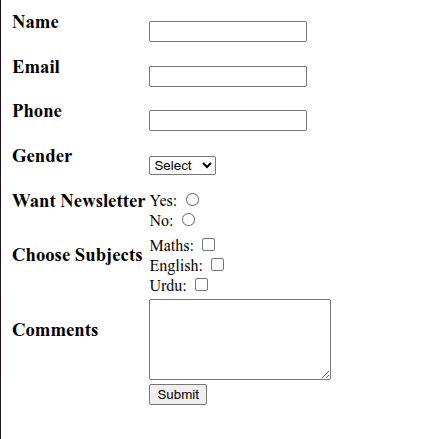
You can download the above form code here.